


Fitbit vs Chest Strap
Compare Fitbit and Pixel Watch optical heart rate with an electrical chest strap, including zone calculations, workout lag, steady exercise, intervals, and practical troubleshooting.
Sep 24, 20268 min read

Introduction
Fitbit and Pixel Watch heart-rate data can be useful for daily trends, easy exercise, and longer steady workouts. A chest strap is more dependable when heart rate changes quickly or when exact time in zone determines how you execute intervals.
That answer needs two qualifications. First, Fitbit-branded trackers and Google Pixel Watches do not all use identical hardware or algorithms. Second, a device can produce a reasonable session average while missing short peaks or transitions. Accuracy must match the question you are asking.
This guide separates three issues that are often mixed together: whether the sensor measured pulse correctly, whether the displayed zone boundaries suit you, and whether a small error would alter your training decision.
Optical Fitbit Measurement Versus a Chest Strap
Current Fitbit-supported devices use optical sensors: green LEDs and photodiodes estimate pulse from blood-volume changes at the wrist. Google’s support guidance notes that personal physiology, placement, and activity affect accuracy (Google Fitbit heart-rate guidance).
An electrical chest strap detects the timing of cardiac electrical signals through electrodes against the torso. That generally makes it more responsive when heart rate rises or falls quickly. The strap can still fail because of dry electrodes, poor contact, depleted battery, damaged fabric, or wireless interference.
The wrist device wins on convenience and continuous wear. The strap wins when the cost of a delayed or noisy exercise signal is higher than the inconvenience of wearing it.
Fitbit Zones May Differ Even When Heart Rate Matches
Fitbit’s zone display is not simply a raw sensor output. On supported devices, personalized zones use heart-rate reserve: estimated maximum heart rate minus resting heart rate, with resting heart rate added back to each percentage boundary. Older or unsupported devices may use percentages of estimated maximum heart rate instead (Google’s zone calculations).
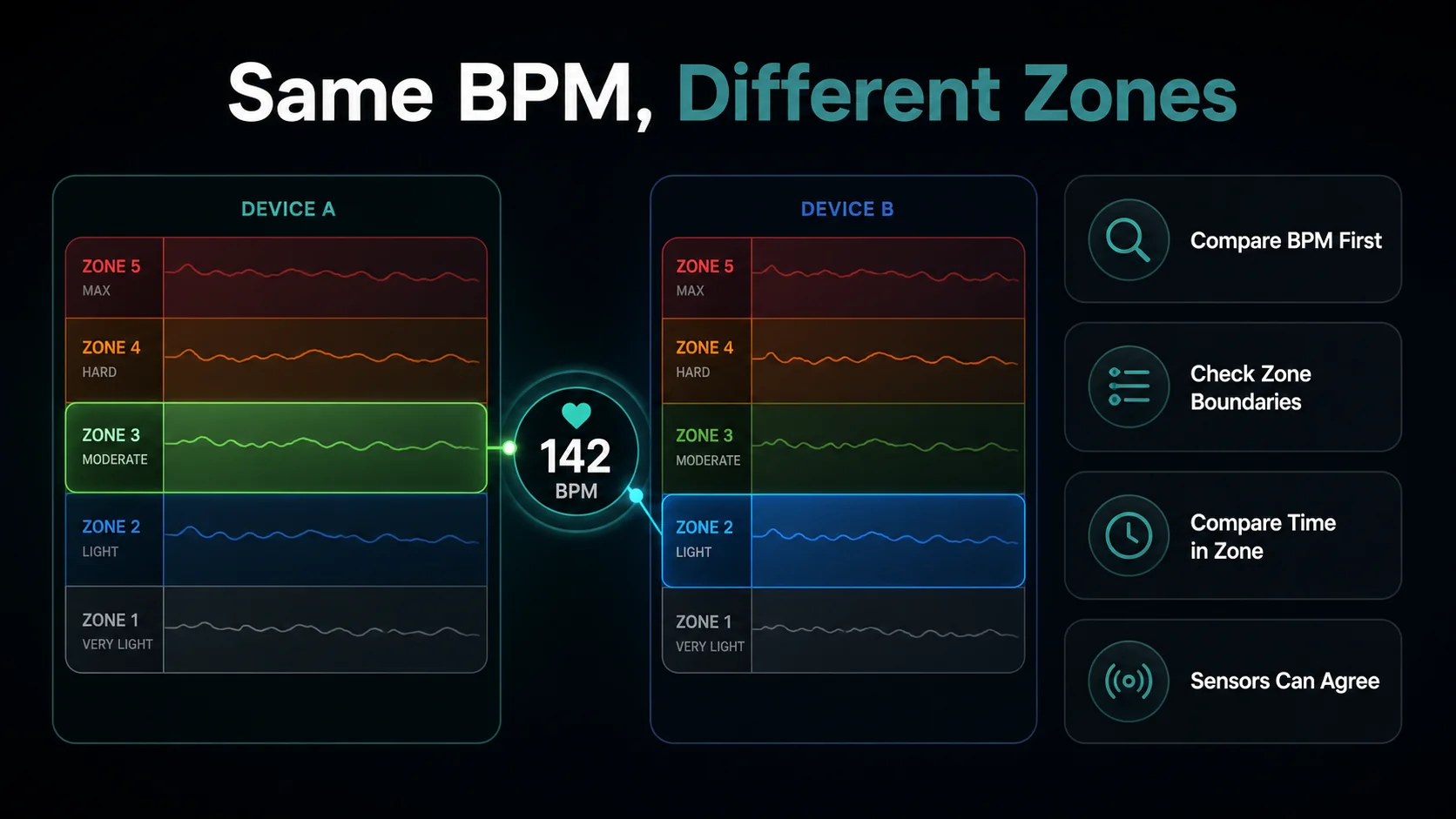
This creates an important diagnostic sequence:
- Compare beats per minute between devices.
- Compare the zone boundaries each platform uses.
- Only then compare time in zone.
If Fitbit and a strap both show 142 bpm but one platform calls it vigorous and another calls it Zone 2, the sensors do not disagree. The classification systems do.
What Independent Studies Found
The evidence is mixed and highly model-specific. A 2022 study comparing Fitbit Charge 4 and Samsung Galaxy Watch Active2 with Holter ECG found both below a 10% mean absolute percentage-error threshold overall, but accuracy varied by activity. Fitbit slightly underestimated overall and performed differently at rest, typing, stairs, and squats (Bent and colleagues).
An earlier free-living validation of Fitbit Charge HR found an average underestimate and larger underestimation in moderate-to-vigorous epochs. It also showed why one-minute averages can hide short errors (Gorny and colleagues). That older model should not define current devices, but it demonstrates the importance of transitions and sampling.
More recent research against 12-lead ECG found Fitbit Charge 5 and Sense 2 among the stronger wrist devices in a protocol containing rest and varied walking, while all devices lost accuracy during rapid heart-rate changes (transient-state validation). A systematic review similarly concluded that heart-rate accuracy varies by manufacturer, device, and setting, making current model-specific evidence more useful than brand reputation alone (Fuller and colleagues).
Steady Walking, Easy Running, and Daily Trends
For walking and easy continuous exercise, Fitbit is often useful when the trace is smooth and agrees with breathing and perceived effort. These sessions change slowly enough for optical processing to keep up, and the decision usually depends on a broad range.
Wear the device above the wrist bone, secure enough not to slide but not painfully tight. Give it time to establish a stable signal. Cold hands, loose fit, tattoos beneath the sensor, sweat under the case, and repeated wrist flexion can all reduce signal quality.
Use daily resting-heart-rate trends differently from workout peaks. A consistently worn optical tracker can be valuable for within-person trends even when it is not ideal for short intervals. Avoid comparing a Fitbit daily average with a strap-only workout average as if the observation windows were identical.
Running Intervals and Fast Changes
During short repetitions, wrist data may lag behind the effort. If a 60-second hill repetition ends before the displayed heart rate peaks, speeding up to “reach the zone” can make the interval harder than prescribed.
Use pace, breathing, or power to control short intervals. A chest strap helps when you want to study how quickly heart rate rises, how far it falls during recovery, or how much time a longer interval spends near threshold.
For longer tempo blocks, Fitbit may settle into a useful range. Compare the stable middle of each block, not the first moments after a pace change. If the trace jumps instantly to a number suspiciously close to cadence, remains flat while effort changes, or shows gaps, treat that section as questionable.
Cycling and Strength Training
Cycling posture can loosen contact or change pressure at the wrist. Road vibration and gripping add motion that an optical algorithm must remove. If you use heart rate together with cycling power to judge aerobic decoupling or interval execution, a strap produces a cleaner comparison.
Strength training is even harder for wrist optics: gripping and wrist flexion change local tissue and sensor contact while repetitions create abrupt motion. A meta-analysis found larger wrist-device differences during resistance training and cycling than during treadmill activities (Zhang and colleagues). Treat Fitbit heart rate during lifting as a broad workload signal, not a precise measure of every set.
A Useful Personal Comparison
If your Fitbit or Pixel Watch cannot record an external chest strap as its workout source, record the same session with the strap on another compatible device or app. Synchronize the start and stop times as closely as possible.
Test a steady session first, then a progressive workout with clear changes. Compare:
- session average and maximum;
- response when each stage begins;
- recovery after each stage;
- obvious flat lines, spikes, or cadence lock;
- total minutes near important zone boundaries.
Repeat the comparison. One workout can be distorted by a loose tracker or dry chest electrodes. The most important finding is a repeatable pattern, such as Fitbit lagging every short interval but agreeing during steady running.
When the Difference Matters
Use Fitbit wrist data for daily monitoring, easy sessions, general activity, and workouts where convenience produces more consistent records. Use a chest strap when you are testing threshold, prescribing intervals by heart rate, analyzing cycling power against heart rate, or repeatedly seeing implausible wrist traces.
Do not replace a useful device because two graphs are not identical. Replace or supplement the source when the difference changes the workout classification or the decision you make next.
Active Zone Minutes Are Not a Chest-Strap Comparison
Fitbit’s Active Zone Minutes are derived from time spent in its configured intensity zones. Vigorous and peak-zone minutes may receive different weighting from moderate-zone minutes (Google’s Active Zone Minutes guide). This is a behavior and motivation feature, not a second sensor measurement.
If a chest-strap app reports sixty minutes of exercise while Fitbit reports a different number of Active Zone Minutes, the values may both be internally correct because they answer different questions. Compare the underlying beats per minute and timestamps before comparing the summaries.
The same caution applies to calorie estimates and readiness-style interpretations. Heart rate is one input among several. Better agreement with a strap can improve confidence in the workout trace without validating every derived number.
Troubleshoot Common Fitbit Patterns
A delayed opening reading
Warm the wrist, reposition the device above the wrist bone, and wait for stable contact. Compare the last thirty minutes of an easy run separately from the opening minutes.
A flat line during progressive effort
Check that the device is actually recording an exercise session and that the sensor window is clean. If breathing and pace rise while heart rate stays fixed, do not use that stage to change zones.
High readings during walking or typing
Wrist movement and local contact can affect optical readings even at low metabolic demand. The Charge 4 and Galaxy Watch Active2 study found some of the larger errors during seated and typing stages, showing that “low intensity” does not always mean “easy to measure” (device evaluation).
Lower peaks than the strap
Repeat a progressive session. Consistent under-reading during transitions is more important than one missed second. If every hard stage is flattened, use the strap recording for interval analysis.
Different zone labels at identical heart rate
Inspect maximum-heart-rate and resting-heart-rate values. Recalculate both systems using the same method before deciding the hardware disagrees.
Example Training Decisions
- Brisk walk: Fitbit and strap differ slightly, but both classify the session as moderate and the trace is smooth. Fitbit is sufficient.
- Easy run near a boundary: Fitbit frequently crosses into vigorous while the strap stays below it. Check the zone formula first, then repeat with improved fit.
- One-minute intervals: Fitbit peaks after the repetition ends. Execute by pace or power and use a strap for the heart-rate review.
- Daily resting trend: Fitbit is worn consistently and the seven-day pattern is stable. Keep the same device rather than substituting sporadic strap readings.
- Strength circuit: Wrist values jump with gripping. Use heart rate only as context and record the strength work directly.
Avoid Accidental Model Generalization
Fitbit Charge, Sense, Versa, Pixel Watch, and future Google wearables should not be treated as one sensor. Even within a product line, firmware and wear position can change performance. When citing a validation result, preserve the tested model name.
For your own training log, record the exact device and whether it was wrist- or strap-derived. That note becomes valuable after an upgrade: an apparent change in zone distribution may be a hardware transition rather than a fitness response.
Conclusion
Fitbit and Pixel Watch optical heart rate can be accurate enough for many steady and everyday uses, but the quality varies by model, movement, fit, and rate of change. Chest straps remain the clearer choice for responsive exercise measurement.
If the beats-per-minute trace looks reasonable but the zones do not, inspect the zone method before blaming the sensor. For more context, compare the same failure modes in Apple Watch vs Chest Strap and Garmin vs Chest Strap, then calculate a comparable range with the Zone 2 Heart Rate Calculator.