

Heart Rate Zones
Apple Watch vs Chest Strap
Apple Watch and chest straps can agree during steady exercise but diverge during intervals, cold weather, or noisy movement. Learn which signal to trust, how to compare devices, and when extra accuracy matters.
Introduction
When Apple Watch and a chest strap disagree, trust a well-fitted, properly functioning chest strap for rapid changes and accuracy-critical training. Trust neither device blindly when the signal is obviously implausible. During steady running, riding, or walking, Apple Watch can often be accurate enough for practical zone decisions, but wrist optical sensing is more vulnerable to motion, fit, skin contact, cold conditions, and delayed response.
The difference matters only when it changes a decision. A five-beat discrepancy near a zone boundary may affect interval pacing; the same discrepancy during an easy recovery walk may be irrelevant. This guide explains how each sensor works, why disagreements happen, and how to run a fair comparison without turning every workout into a device test.
This is a companion to Are Apple Watch Heart Rate Zones Accurate?. That article covers the complete zone system; this one focuses narrowly on wrist-versus-chest measurement.
How Apple Watch Measures Heart Rate
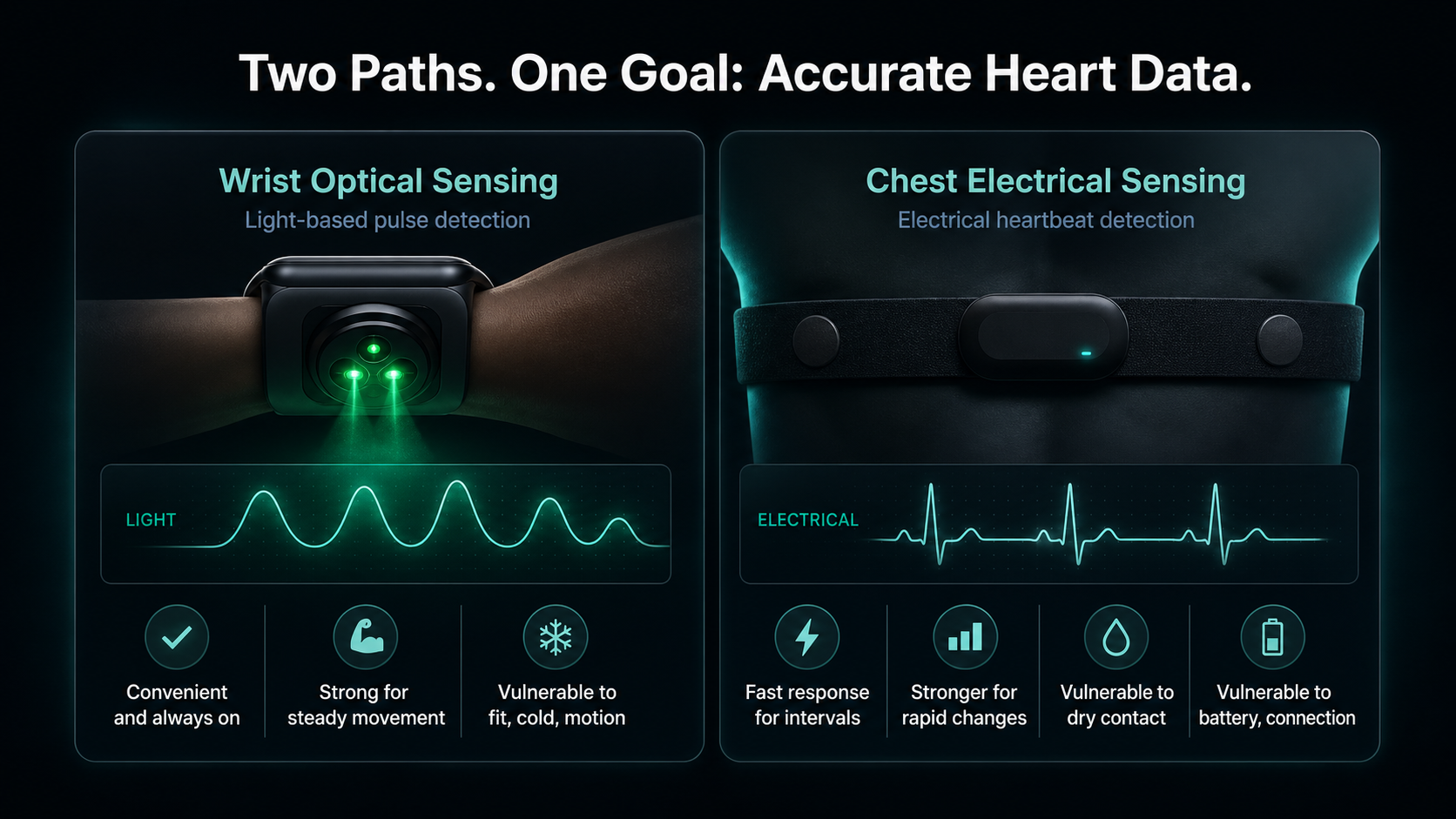
Apple Watch primarily uses photoplethysmography during workouts. LEDs illuminate the skin and optical sensors estimate pulse-related changes in blood volume. Software filters the signal and converts it into heart-rate estimates.
Optical measurement is convenient because the sensor is already on the wrist. It can work very well when skin contact is stable and the movement pattern is predictable. It also has physical limitations. Arm motion, vibration, loose fit, tattoos or other optical interference, cold skin, sweat, and cadence-like movement can make the pulse signal harder to distinguish.
A living systematic review and meta-analysis found low pooled mean bias for Apple Watch heart rate, but moderately wide limits of agreement; accuracy varied with conditions, intensity, movement, model, and population (Abdullah and colleagues). A low average bias does not mean every reading is exact. Positive and negative errors can average out across many people while an individual workout still contains meaningful deviations.
How a Chest Strap Measures Heart Rate
Most heart-rate chest straps use electrodes to detect the electrical signal associated with each heartbeat. The method is closer to electrocardiographic timing than wrist optical pulse detection, although a consumer chest strap is not a diagnostic ECG.
Chest straps are positioned on the torso, where they are less affected by arm swing. They usually respond quickly to changes, making them useful for intervals, short climbs, recovery between repetitions, and threshold tests.
They can still fail. Dry electrodes, poor contact, a worn battery, static from clothing, an incorrectly positioned strap, or connection problems can produce spikes, dropouts, or a flat line. “Chest strap” is not a guarantee of perfect data.
What Validation Research Shows
In a Cleveland Clinic validation study, an electrode chest strap showed the strongest agreement with ECG across several aerobic exercise modes. Apple Watch also performed well overall, but agreement varied by activity; the authors recommended electrode-containing chest monitors when accurate measurement was imperative (Gillinov and colleagues).
More recent evidence remains broadly reassuring but context-dependent. The living systematic review reported that most included exercise studies had mean absolute percentage error below 10%, while pooled limits of agreement still indicated variability of roughly several beats in either direction (Abdullah and colleagues).
The practical conclusion is not that Apple Watch is inaccurate. It is that a chest strap generally provides a stronger reference when timing and rapid changes matter, while Apple Watch is often sufficient for steady endurance use.
Why the Numbers Disagree
Heart-rate response versus sensor response
Heart rate itself takes time to respond to a sudden increase in effort. On top of that physiological lag, an optical algorithm may smooth or delay the displayed value. A chest strap may therefore show the rise and fall earlier.
Watch fit
A loose watch can move independently from the skin. Wear it snugly above the wrist bone during training without making it uncomfortably tight.
Cold conditions
Cold reduces peripheral blood flow and can make wrist optical measurement harder, especially early in a session. Warm up gradually and keep the wrist covered when practical.
Movement and vibration
Fast arm motion, strength circuits, gripping handlebars, rough roads, trail descents, and irregular movement can degrade optical contact.
Cadence lock
Sometimes a wrist sensor can report a number close to step cadence rather than pulse. Suspect this when heart rate jumps abruptly to a stable value that matches running cadence and does not fit breathing or effort.
Chest-strap contact
Dry electrodes can misread at the start. Moistening the contact points, tightening the strap correctly, and washing it according to manufacturer guidance can help.
Battery or connectivity
A dying strap battery or unstable Bluetooth connection can create dropouts. Check the source device and connection before interpreting physiology.
Which Signal Should You Trust?
Steady easy exercise
If both devices show plausible, stable values and differ only slightly, either can usually guide a broad easy-zone decision. Use breathing and perceived effort as confirmation.
Short intervals
Prefer the chest strap. Rapid response matters, although pace or power and perceived effort may still be better real-time targets because heart rate itself lags.
Threshold tests
Prefer the chest strap and confirm that it is functioning before the test. A bad reference creates bad zone settings.
Cold starts or irregular movement
Prefer the chest strap until the wrist signal stabilizes. Do not use an obviously implausible early reading to change the workout.
Long steady sessions
Apple Watch may be adequate when fit and signal are stable. A chest strap is useful if the session is being used to assess drift, set thresholds, or compare small changes.
Medical decisions
Neither device should be used as a substitute for medical evaluation or diagnostic monitoring. Seek care for concerning symptoms regardless of the displayed number.
How to Run a Fair Comparison
Use one controlled session rather than comparing two devices across different days.
- Charge or replace batteries.
- Wear the watch snugly above the wrist bone.
- Moisten and position the chest-strap electrodes correctly.
- Confirm that the intended source is connected.
- Warm up for 10–15 minutes.
- Perform a steady segment, several controlled increases, and recoveries.
- Record laps or timestamps.
- Compare patterns after the workout, not only live numbers.
Look for:
- average difference during a steady segment;
- delay at the start of each interval;
- dropouts or abrupt spikes;
- disagreement during recovery;
- whether either signal conflicts with breathing and perceived effort.
One comparison is not enough to prove a device is consistently wrong. Repeat the process under similar conditions and once in the environment where problems usually occur.
Pairing a Chest Strap With Apple Watch
Apple Watch can use compatible Bluetooth health accessories. Pairing steps and supported behavior can change with watchOS and accessory firmware, so follow the current Apple Watch guide and the strap manufacturer’s instructions rather than relying on an old screenshot.
After pairing, verify the source during a simple warm-up. Do not assume a saved accessory connected successfully merely because it worked last week. Apple’s Health documentation also allows data from apps and Bluetooth devices, and users can review data-source priority in Health (Apple Support).
When analyzing the workout later, note which sensor supplied the heart-rate record. Otherwise, a cleaner graph may be credited to the wrong device.
Do You Need a Chest Strap for Zone 2?
Not necessarily. For steady Zone 2 exercise, Apple Watch can often provide enough accuracy when:
- the fit is stable;
- the workout uses regular movement;
- conditions are not extremely cold;
- the reading agrees with breathing and perceived effort;
- small beat-to-beat differences do not change the decision.
A chest strap becomes more valuable when:
- wrist readings frequently spike or drop;
- you perform intervals or threshold testing;
- you compare cardiac drift across repeatable sessions;
- zone boundaries are being calibrated;
- cycling posture or grip repeatedly disrupts wrist readings;
- accurate heart-rate timing is important to the analysis.
Buying more equipment is not the first troubleshooting step. Improve watch fit, warm up, inspect the pattern, and confirm zone settings before assuming every surprising workout needs a new sensor.
How Sensor Choice Affects Time in Zone
Time-in-zone charts inherit sensor error and zone-setting error. A noisy reading can add false high-intensity minutes. A delayed wrist response can undercount short hard intervals. Incorrect zone boundaries can misclassify perfectly measured heart rate.
Review time in zone with the workout structure:
- Did high-zone minutes occur during planned work?
- Did a spike appear without a change in pace, power, breathing, or terrain?
- Did the sensor miss the first part of every interval?
- Was the watch loose or the weather cold?
- Were the zone boundaries sport-specific and current?
Do not edit your zones to make one noisy workout look correct. Fix the measurement problem first.
Common Troubleshooting Sequence
- Check whether the number is physiologically plausible.
- Compare it with breathing, effort, pace, power, and cadence.
- Improve watch or strap contact.
- Check battery and connection.
- Repeat on a familiar route or indoor workout.
- Compare patterns from both sensors.
- Adjust zone settings only if the underlying heart-rate signal is credible.
This sequence separates three different problems: sensor accuracy, zone calculation, and training interpretation.
When to Ignore the Difference
Ignore small differences when both signals lead to the same decision. If the workout is clearly easy, breathing is conversational, and both devices remain near the intended range, debating 132 versus 136 beats per minute adds little value.
Pay attention when disagreement changes the session classification, hides a rapid response, produces implausible spikes, or repeats under the same conditions. Precision should serve the training question rather than becoming the workout’s purpose.
Safety Note
Wearable heart-rate devices are not diagnostic instruments. Stop exercising and seek urgent medical care for chest pain, fainting, severe shortness of breath, or a new irregular heartbeat. Discuss persistent unexplained readings or symptoms with a clinician rather than trying to settle them by comparing consumer devices.
Conclusion
Apple Watch can be accurate enough for many steady endurance decisions, while a chest strap is generally the better reference for rapid changes, threshold testing, and accuracy-sensitive analysis. Both can produce bad data when fit, contact, battery, or connectivity is poor.
Once the signal is trustworthy, learn how to turn Apple Watch data into a training log that preserves zones, workout context, and weekly trends. If you are comparing another major watch platform, the Garmin vs chest strap guide applies the same test-first approach to Garmin devices. For Samsung devices, the Galaxy Watch vs chest strap guide uses the same controlled comparison.
When numbers disagree, check plausibility, context, and signal quality before choosing a winner. Trust the device that behaves consistently across a controlled comparison—and use breathing, perceived effort, pace, and power to confirm that the number tells the same story as the workout.

Our editorial approach & AI disclosure
We use AI to help research, organize, and draft some articles. Every article is reviewed by a human editor and aims to reflect current evidence-based training practices and scientific literature.
Read our editorial policy