

Training Log & Analytics
How Do You Turn Apple Watch Data Into a Training Log?
Apple Watch records the workout, but Zone Training Log turns that data into a practical training log with zones, notes, tags, summaries, and weekly context.

Introduction
To turn Apple Watch data into a useful training log, you need more than a workout summary. You need a system that imports the workout, reads the heart-rate data, calculates time in zones, adds context such as notes and tags, and then shows how the session fits into your week. That is the job Zone Training Log is built for.
Apple Watch is excellent at capturing the session. It can record workout duration, heart rate, route, distance, energy, and related metrics depending on the activity. Apple also shows heart-rate zones during cardio-focused workouts, with zones calculated from your maximum heart rate and Health data when required profile details are available (Apple Watch User Guide). But recording data is only the first step.
A training log answers a different question: what does this workout mean for the next decision? Was the easy run actually easy? Did the ride spend too much time in moderate intensity? Did the week include enough low-zone volume? Did a hard workout land where it was planned? Zone Training Log takes Apple Watch and Apple Health data and turns it into a daily timeline, zone-first workout detail, and longer-range summaries so those questions are easier to answer.
What Apple Watch Gives You
Apple Watch gives you the raw ingredients of a training log. During workouts, Apple says the watch measures heart rate continuously and for three minutes after the workout ends, and it uses a light-based optical sensor for most heart-rate readings (Apple Support). For many endurance athletes, that is enough to create a useful picture of training intensity.
The important word is "picture." Heart rate is an internal response. It shows how your body responded to the work, not only how fast you moved or how many watts you produced. Training-load researchers distinguish internal load, such as heart rate and perceived effort, from external load, such as pace, power, distance, or elevation (Bourdon et al., International Journal of Sports Physiology and Performance).
That is why Apple Watch data becomes more valuable when it is organized over time. One workout can tell you what happened today. A training log shows whether that pattern is repeating, improving, or slowly drifting away from the plan.
What A Training Log Adds
A real training log adds context around the Apple Watch file. It does not just collect workouts. It helps you remember what the workout was for, how it felt, and how it affected the training week.
For heart-rate-zone training, the most useful additions are:
- Time in each heart-rate zone.
- A day-by-day timeline that includes workouts and rest days.
- Workout titles and notes.
- Tags for workout purpose, terrain, plan, gear, or training phase.
- Effort score or perceived difficulty.
- Weekly, monthly, and custom-range summaries.
- Zone distribution across a whole block, not only one session.
- Editable zones when the default boundaries do not match your physiology.
This matters because heart-rate monitoring is useful but not self-explaining. Achten and Jeukendrup reviewed heart-rate monitoring in sport and described both its practical training uses and its limitations, including the need to interpret heart rate in relation to conditions and individual response (Sports Medicine). A log gives you the missing context.
The Apple Watch-To-Training Log Workflow
The workflow is simple: Apple Watch records the workout, Apple Health stores the health record, and Zone Training Log turns that record into a training log.
In Zone Training Log, the iOS app reads Apple Health data only after you grant permission. The app can read workouts, heart rate, workout routes when available, resting heart rate, energy, distance, effort metrics, running and cycling power, and date of birth where needed for zone calculations. It can also write manual workouts and effort values back to Apple Health when you choose to create or update them, as described in the Zone Training Log privacy policy.
After import, each workout becomes part of a daily timeline. That is the first practical difference between "data" and "log." Instead of a loose list of sessions, you see training days, rest days, time ranges, activity types, average heart rate, distance, elevation, energy, effort, and zone distribution in one place.
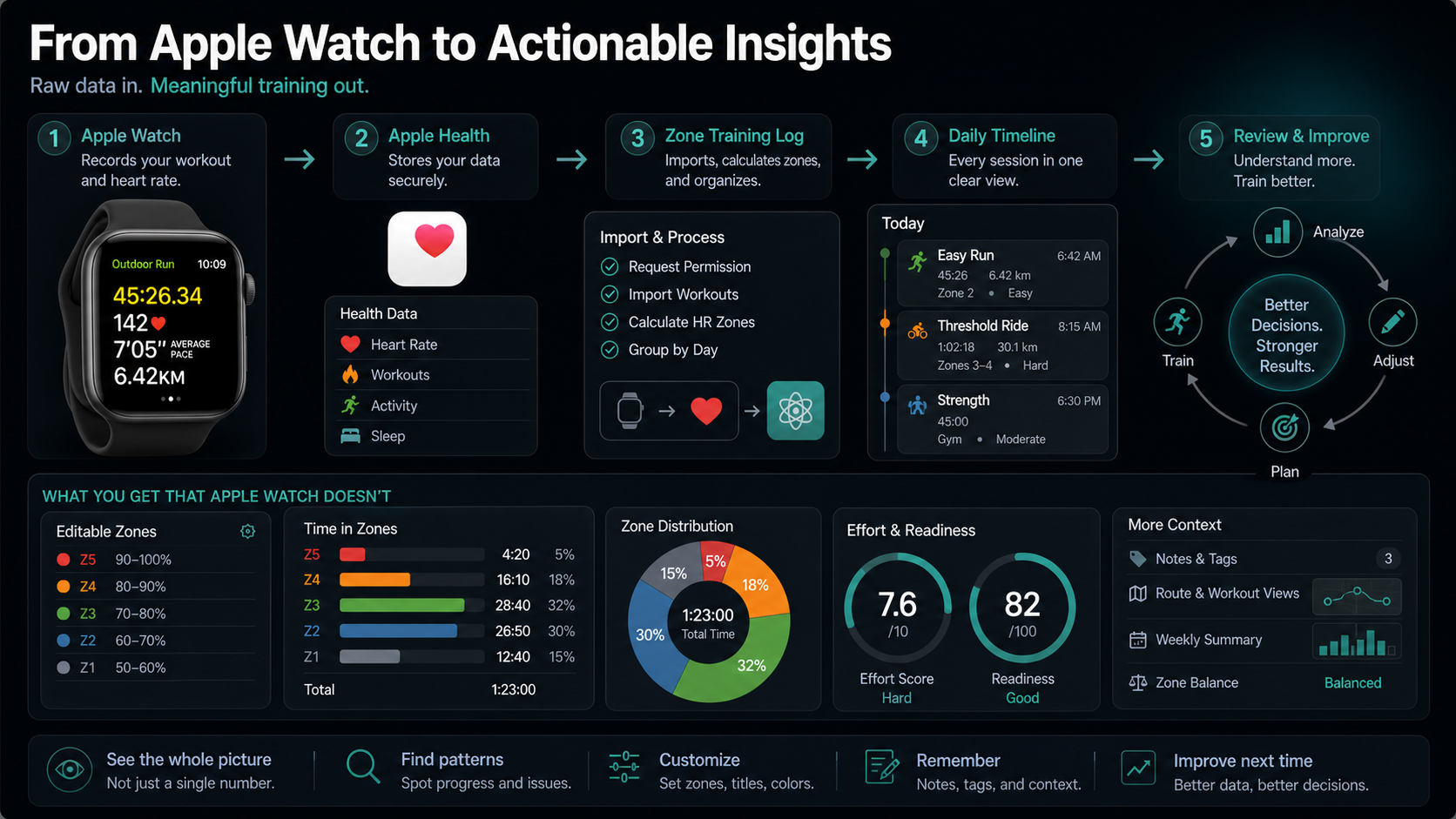
Step 1: Connect Apple Health
The first step is permission. Health data is sensitive, so Zone Training Log does not read Apple Health workouts until you allow access. This fits Apple's HealthKit model, where apps request authorization for specific data types before reading or writing health information (Apple HealthKit documentation).
Once connected, Zone Training Log can import the workout data needed for a zone-based log. That includes workouts and heart-rate samples, but it can also include route, distance, elevation, energy, effort, running power, cycling power, and resting heart rate when those records exist.
This is important because a workout is rarely explained by heart rate alone. A Zone 3 block on a flat easy run means something different from the same Zone 3 block on a steep hike. A high heart rate in heat means something different from a high heart rate on a cool day with unusually strong pace. A good log preserves those details.
Step 2: Set Zones You Can Trust
The next step is zone setup. Apple Watch can show zones, but any zone system is only as useful as its boundaries. If the maximum heart rate estimate is too low, easy workouts may look too hard. If it is too high, hard workouts may look easier than they are.
Zone Training Log supports editable zones and multiple setup approaches. You can use heart-rate reserve, maximum heart rate, an age-based method, or manual editing. The app can also use Health data, such as recent maximum heart rate and resting heart rate, to help start the setup.
This matters because age-based maximum heart-rate formulas are population estimates, not precise values for every athlete. Tanaka, Monahan, and Seals proposed the widely used 208 minus 0.7 times age equation, but the broader lesson is that individual variation remains large enough to affect training zones (Journal of the American College of Cardiology01054-8)).
After you change zones, Zone Training Log can recalculate stored zone summaries for past workouts. That keeps the log internally consistent when you refine your zone model.
Step 3: Review Each Workout In Context
Once a workout is imported and zones are set, the log should help you read the session quickly. Zone Training Log does that with a workout row and a workout detail screen.
The timeline row gives the fast scan: activity type, title, duration, time range, available metrics, tags, effort, and a segmented zone distribution bar. The detail view goes deeper with a heart-rate chart segmented by zone colors, zone threshold rules, transition markers, route map when available, and metrics such as average heart rate, distance, pace, elevation, energy, source app, and device.
That structure supports better decisions. You can ask whether the workout matched the intended purpose, whether the high-zone time was planned, whether a long easy workout drifted late, and whether the effort score agrees with the heart-rate chart.
It also protects you from overreacting to one metric. Apple notes that heart-rate sensor performance can be affected by factors such as fit, skin perfusion, motion, tattoos, and cold conditions, and that a Bluetooth chest strap can be paired when more reliable readings are needed (Apple Support). A log lets you notice whether a strange reading is a one-off artifact or a repeated pattern.
Step 4: Add Notes, Tags, And Effort
Apple Watch can record what happened. You still know why it happened.
That is why Zone Training Log lets you add titles, notes, tags, and effort. A workout titled "Easy run" with tags for "heat," "trail," or "post-race recovery" is more useful than a generic run file three weeks later. Effort score adds another layer: how hard the workout felt compared with what the heart-rate data says.
These subjective details are not fluff. In practice, they help explain the mismatch between internal and external load. A ride with normal power but unusually high heart rate may be heat, fatigue, stress, or dehydration. A run with low heart rate but high perceived effort may be under-recovery, poor fueling, or muscular fatigue. Without notes, those patterns are easy to forget.
For athletes who plan workouts, tags and titles also separate intention from outcome. "Zone 2 aerobic," "threshold," "long run," "hills," and "recovery" should not be evaluated the same way. The right zone distribution depends on the job of the workout.
Step 5: Zoom Out To Weekly And Monthly Summaries
The biggest value of a training log appears when you zoom out. One workout is noisy. A week or month shows the pattern.
Zone Training Log includes day, week, month, and custom-range summaries. Those summaries can show total time, workout count, average duration, average heart rate, average zone, average effort, distance, speed, elevation, energy, zone distribution, and per-zone analytics. That makes it easier to see whether your easy volume is staying easy, whether intensity is concentrated where intended, and whether a block is becoming too hard.
This is the kind of question heart-rate-zone logging is built to answer. Seiler and Kjerland studied well-trained endurance athletes and compared intensity distribution using heart rate, session rating of perceived exertion, and blood lactate. Their findings showed most endurance training below the first threshold with a smaller share at high intensity (Scandinavian Journal of Medicine & Science in Sports). You do not need to copy elite skiers, but you do need a way to see your own distribution.
Zone Training Log's summaries make that distribution visible. If most "easy" days keep becoming moderate, the weekly chart will show it. If a hard block contains almost no hard-zone time, the summary will show that too.
Step 6: Use Readiness And Zone Balance As Checks
A training log should help you decide what to do next. Zone Training Log includes pulse-style views such as readiness and zone balance to make the next decision easier.
Readiness compares recent load with a longer baseline and uses zone load plus effort to estimate whether the recent period looks fresh, balanced, heavy, or strained. Zone balance compares low-zone time with higher-zone time over a recent window. These are not medical diagnoses and should not replace how you feel, but they are useful training checks.
For example, if the next workout is supposed to be hard but the recent week is already heavy, you may decide to shorten the session or keep it aerobic. If your zone balance shows very little low-intensity time, you may protect the next easy day more carefully. If readiness looks balanced and your notes agree, you may keep the plan.
The practical value is consistency. The app gives you the same review structure every time: what happened today, what happened this week, and whether the next workout still makes sense.
What Zone Training Log Does Not Try To Replace
Zone Training Log does not need to replace Apple Fitness or Apple Health. Apple Health remains the health data source. Apple Fitness remains useful for native workout history and activity rings. Zone Training Log is the training-analysis layer focused on heart-rate zones, context, summaries, and planning.
That distinction also matters for privacy. Before you connect a Zone Trainer web account, the app keeps detailed workout processing local by default. If you connect an account, the app can sync a compact cross-platform training mirror that includes zone profiles, tags, activity colors, planned workouts, workout metadata, workout type, start and end time, duration, effort, average and maximum heart rate, distance, pace, elevation, energy, zone metrics, and a compact heart-rate preview series. The privacy policy states that normal account sync does not upload every raw heart-rate sample or full HealthKit routes as part of that mirror (Zone Training Log Privacy Policy).
That makes the product useful for two different workflows. You can use the iOS app as a local-first Apple Health training log. Or you can connect the web account when you want cross-device access and web viewing.
A Simple Weekly Routine
Here is a practical way to use Apple Watch data inside Zone Training Log:
- Record workouts normally on Apple Watch or another Apple Health-compatible app.
- Open Zone Training Log and let it import the latest workouts from Apple Health.
- Check each workout's zone distribution and effort score.
- Add a title, note, or tag when the context matters.
- Review the weekly summary for total time, zone distribution, effort, and average zone.
- Use zone balance and readiness as a check before the next hard session.
- Revisit zone settings when the data repeatedly disagrees with breathing, RPE, or known fitness.
That workflow turns Apple Watch from a recorder into part of a training system. The watch captures the session. Zone Training Log keeps the context.
Related Apple Watch Workflow Guides
- Check Apple Watch heart-rate-zone accuracy
- Use Apple Watch heart-rate zones during training
- Verify the Apple Watch to Apple Health connection
- Review heart-rate zones after a workout
Conclusion
Apple Watch data becomes a training log when it is organized around decisions. Heart rate, distance, pace, energy, route, and effort are useful, but they become much more useful when they are grouped into days, summarized by zones, connected to notes and tags, and reviewed across weeks.
Zone Training Log is built for that layer. It reads Apple Health with permission, calculates heart-rate zone summaries, keeps workouts in a daily timeline, lets you customize zones and context, and shows longer-range trends so your next session is easier to choose.
Apple Watch records what happened. Zone Training Log helps you understand what it means.

Our editorial approach & AI disclosure
We use AI to help research, organize, and draft some articles. Every article is reviewed by a human editor and aims to reflect current evidence-based training practices and scientific literature.
Read our editorial policy