

Data Diagnostics
Are Apple Watch Heart Rate Zones Accurate?
Apple Watch heart rate zones are often useful for steady endurance training, but accuracy depends on wrist sensor quality, zone settings, max heart rate estimates, workout type, and conditions.

Introduction
Apple Watch heart rate zones are usually accurate enough to guide many steady endurance workouts, but they are not perfectly accurate for every athlete or every session. The short answer is: they can be useful for easy runs, rides, hikes, and longer steady efforts, but they become less reliable when the wrist reading is noisy, your maximum heart rate estimate is wrong, or the workout changes intensity too quickly.
Apple describes Heart Rate Zones as five effort segments based on a percentage of your maximum heart rate, automatically calculated and personalized from Health data when your date of birth is entered (Apple Watch User Guide). That means zone accuracy depends on more than the sensor. The watch must read your heart rate well, and the zone boundaries must match your physiology.
If you are looking for the formula and settings rather than sensor accuracy, start with how Apple Watch calculates heart-rate zones.
So the better question is not "Is Apple Watch accurate?" It is "Accurate enough for which training decision?"
Apple Watch Zone Accuracy at a Glance
| Training situation | How much to trust the zone | Best cross-check |
|---|---|---|
| Steady easy run, ride, or hike | Usually useful once the reading settles | Breathing, talk test, and a repeatable route |
| Short intervals or rapid pace changes | Limited because heart rate lags effort | Pace, power, interval structure, and perceived effort |
| Cold weather, loose fit, or jumpy readings | Verify before changing training | Snug fit, a controlled repeat, or a chest strap |
| Weekly time-in-zone review | Useful when you look for patterns across sessions | Compare similar workouts and note heat, hills, and fatigue |
For setup help, use the Apple Watch connection guide. If the zones themselves look misplaced, check how your boundaries are calculated before changing an easy-day plan.
Is Apple Watch Zone 2 Accurate?
Apple Watch Zone 2 can be a useful training cue, but the label alone does not confirm that the sensor reading or your zone boundaries are right. Check them separately:
- Check the reading. Use a steady session and a snug fit. Apple lists fit, motion, cold conditions, and skin perfusion among factors that affect wrist readings; an external heart-rate monitor can help when readings remain inconsistent (Apple Support).
- Check the boundaries. Open Workout > Heart Rate Zones in Watch settings and note the actual BPM limits. Apple personalizes its automatic zones from Health data and allows manual boundaries (Apple Watch User Guide). See how Apple Watch calculates those zones before comparing them with a different method.
- Check the effort. Compare similar sessions with breathing and perceived effort. The CDC talk test describes broad exercise intensity; it does not certify an exact personal Zone 2 threshold.
Use the Zone 2 heart-rate calculator to compare planning estimates. If the numbers and effort disagree repeatedly, investigate the reading and setup before changing your training.
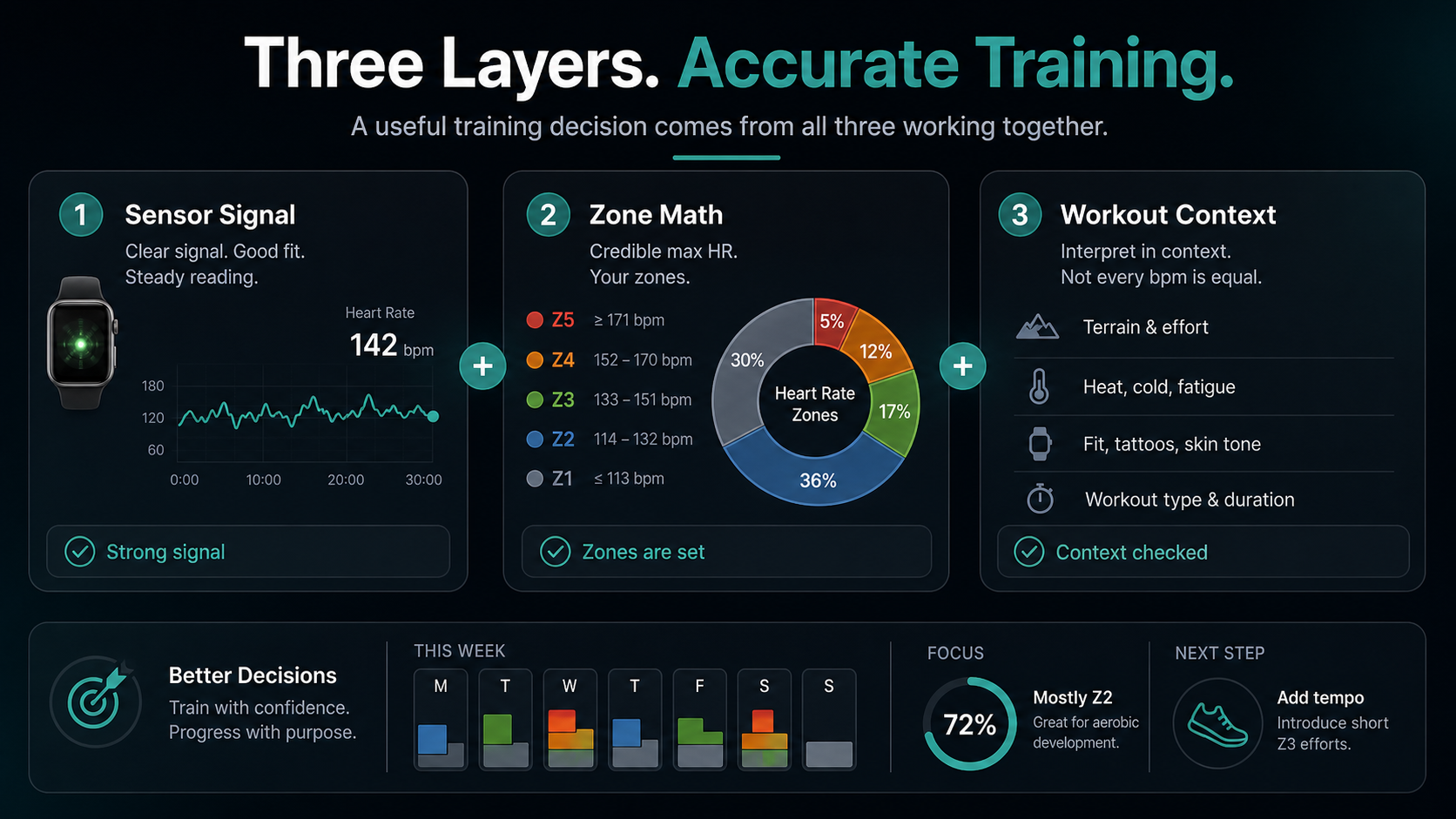
Why Accuracy Depends On Three Things
Apple Watch heart rate zones can be inaccurate for three different reasons.
First, the optical sensor has to read your pulse correctly at the wrist. If the watch is loose, the arm movement is irregular, the weather is cold, or the sensor has a poor optical signal, the heart-rate number can be wrong.
Second, Apple Watch has to convert that heart rate into zones using a credible maximum heart rate or manual zone setup. Even a perfect heart-rate reading can land in the wrong zone if the boundaries are poorly set.
Third, you have to interpret the zone in context. A few seconds above Zone 2 on a hill is different from spending half of an easy run in Zone 3. A hard one-minute interval may not show much Zone 5 time because heart rate lags behind effort. A long hot run may show higher zones because heart rate drifts upward even if pace stays steady.
Why Zone Setup Changes Accuracy
Apple Watch does not directly measure lactate threshold, ventilatory threshold, or your exact aerobic base. It uses heart-rate zones. Apple says the zones are a percentage of maximum heart rate and are personalized from Health data, with five segments ranging from easier to harder (Apple Watch User Guide).
By default, those zones are calculated for you. You can also edit them manually on Apple Watch by going to Settings, Workout, Heart Rate Zones, then Manual. On iPhone, Apple says the same setting is available in the Watch app under My Watch, Workout, Heart Rate Zones (Apple Watch User Guide).
That manual option matters because automatic zones can be reasonable without being personal enough. Many zone systems start from age-predicted maximum heart rate. Tanaka, Monahan, and Seals found that age-predicted maximum heart rate is a population estimate with individual variation, not a precise value for every person (Journal of the American College of Cardiology01054-8)).
If your true maximum heart rate is higher than the watch assumes, your zones may be set too low. Easy workouts may look too hard. If your true maximum is lower, the zones may be set too high, and hard workouts may look easier than they are.
What Research Says About The Sensor
The Apple Watch optical sensor can be quite useful for heart-rate monitoring, especially during steady aerobic activity. In a Stanford-led study of seven wrist-worn devices, Shcherbina and colleagues reported that most devices measured heart rate adequately during lab-based activities, while energy expenditure estimates were much less accurate. In that study, Apple Watch had the lowest overall error among the devices tested, but error still varied by activity and participant characteristics (Journal of Personalized Medicine).
Another study in JAMA Cardiology compared wrist-worn heart rate monitors against electrocardiography during aerobic exercise and found that accuracy varied across devices and exercise conditions (JAMA Cardiology). That supports a practical middle ground: wrist heart rate is not fake, but it is not a lab-grade measure in every setting.
Apple's own support documentation is consistent with that. Apple explains that the watch measures heart rate continuously during workouts and for three minutes after a workout ends, and that the optical heart sensor uses photoplethysmography, a light-based method for detecting blood-flow changes in the wrist (Apple Support). Apple also notes that some anomalies may appear in displayed data, including occasional heart-rate measurements that are abnormally high or low (Apple Support).
For training, this means an isolated weird spike or drop should not automatically change your plan. Look for patterns.
When Apple Watch Zones Are Usually Reliable
Apple Watch zones are most useful during steady workouts where heart rate changes gradually. Easy runs, easy rides, long walks, hikes, steady indoor cycling, and longer tempo intervals are good use cases. The signal has time to settle, and the zone display can help you avoid creeping too hard.
They are also useful for weekly review. One workout may include a few odd readings, but a week of workouts can still show whether most time was easy, moderate, or hard. If your easy sessions consistently show large amounts of Zone 3, either the workouts are not really easy, the zones are set too low, or the sensor is struggling.
Apple Watch zones are especially helpful when they agree with effort. If the watch says Zone 2 and you can breathe comfortably, talk in full sentences, and finish the session feeling repeatable, the zone is probably doing its job. If the watch says Zone 4 but you feel relaxed, or it says Zone 1 while you are breathing hard, investigate before trusting the number.
When They Become Less Accurate
Short intervals are a common weak spot. Heart rate does not rise instantly when effort increases. A 30-second or one-minute interval can be very hard even if the watch never reaches Zone 5 during the work period. For short repeats, pace, power, incline, and perceived effort often describe the session better than live heart-rate zone color.
Wrist fit is another common issue. Apple says the watch should fit snugly on top of your wrist during workouts so the sensor stays close to your skin (Apple Support). A loose watch can shift with each stride or pedal stroke and produce noisy readings.
Skin and environment matter too. Apple lists skin perfusion, cold conditions, tattoos, and motion as factors that can affect heart-rate sensor performance. The company notes that rhythmic activities such as running or cycling tend to give better results than irregular movements such as tennis or boxing (Apple Support).
Heat, hills, fatigue, caffeine, dehydration, and stress can also move heart rate higher than expected. That is not always sensor error. Sometimes the watch is measuring your heart rate correctly, but the workout is harder on your body than the pace suggests.
How To Check Whether Your Zones Make Sense
Start with a simple reality check. During an easy aerobic session, the watch should usually show mostly low zones. You should be able to speak in full sentences. The CDC describes moderate intensity as an effort where you can talk but not sing, while vigorous intensity makes speaking more difficult (CDC). If your watch says easy but your breathing says hard, do not ignore your body.
Compare similar workouts under similar conditions. Pick a familiar route, duration, and effort. If the same easy run always falls in Zone 3, your automatic zones may be too low, your easy pace may not be easy, or the watch may be reading high. If the same steady effort jumps between zones without any change in pace, terrain, or effort, suspect measurement noise.
Check your Health details. Apple says personal information such as height, weight, sex, and age helps Apple Watch calculate daily activity metrics, and keeping those details updated can improve accuracy (Apple Support). For heart rate zones specifically, make sure your date of birth is entered because Apple says zones are calculated only when that detail is present (Apple Watch User Guide).
Then consider manual zones. If you have a tested maximum heart rate, lactate-threshold heart rate, or coach-prescribed zone system, manually editing zones can make the watch more useful. The device can still measure heart rate, but your boundaries become more specific to your training.
How To Improve Apple Watch Heart Rate Accuracy
Wear the watch snugly during workouts, then loosen it afterward if needed. The goal is not discomfort; it is stable sensor contact. Apple specifically recommends a snug fit on top of the wrist for the most accurate heart-rate measurement during Workout (Apple Support).
Choose the workout type that best matches what you are doing. Apple says the watch selects inputs depending on the workout, and for indoor running it also uses the accelerometer (Apple Support). Choosing a mismatched workout type can reduce the quality of the overall estimate, especially for distance, calories, and context.
Warm up before judging the zones. Optical readings and physiological response can both be messy in the first few minutes. If the number looks strange early, give it time to stabilize unless you feel symptoms that require stopping.
Use a chest strap or external heart-rate monitor when precision matters. For a practical sensor-by-sensor comparison, see Apple Watch vs chest strap heart-rate accuracy. Apple says you can connect Apple Watch wirelessly to external heart-rate monitors such as Bluetooth chest straps if you cannot get consistent readings because of fit, skin, motion, or other factors (Apple Support).
What To Do If The Zones Feel Wrong
If the watch says you are too high on every easy workout, slow down for one controlled session and compare breathing, pace, and heart rate. If it still looks too high while effort is clearly easy, review your max heart rate and zone settings.
If the watch says you are too low during hard workouts, do not keep pushing just to make the zone color change. Heart rate lag can hide short high-intensity work. Use perceived effort, pace, power, or interval structure to guide the session.
If the data is jumpy, fix measurement first: snug fit, clean sensor, correct workout type, and stable wrist placement. If it remains unreliable, use an external sensor for workouts where zone precision matters.
If your zones suddenly change after a software update, new watch, updated Health details, manual edit, or a change in max heart rate, compare workouts across the change carefully. A different zone chart does not always mean your fitness changed.
Conclusion
Apple Watch heart rate zones are accurate enough for many practical training decisions, especially steady aerobic workouts and weekly time-in-zone review. They are not accurate enough to blindly trust every reading, every interval, or every automatic zone boundary.
Use them as one input. The best training read comes from the watch, your breathing, perceived effort, pace or power, terrain, weather, and recovery together. When those signals agree, Apple Watch zones are a useful guide. When they disagree, check the sensor, check the zone settings, and trust the broader pattern over one color on the screen.
Related Apple Watch Training Guides

Our editorial approach & AI disclosure
We use AI to help research, organize, and draft some articles. Every article is reviewed by a human editor and aims to reflect current evidence-based training practices and scientific literature.
Read our editorial policy