

Heart Rate Zones
How Accurate Is AirPods Pro 3 Heart Rate?
Independent testing found low average heart-rate error from AirPods Pro 3 during treadmill exercise, but accuracy still depends on intensity, fit, movement, and the training decision you need to make.

The Short Answer
AirPods Pro 3 heart-rate readings appear accurate enough for many fitness and endurance-training decisions. In the first independent laboratory validation study focused on the product, AirPods Pro 3 stayed close to a Polar H10 chest strap on average during rest, walking, running, and recovery. The mean absolute error was 2.08 beats per minute, and the mean percentage error was 2.02%.
That is a strong result for a consumer optical sensor. It does not mean every displayed number is within two beats of a chest strap. The same study found wider moment-to-moment variation at higher heart rates, with overall 95% limits of agreement of roughly 10 beats per minute in either direction. AirPods Pro 3 can therefore be useful for steady training, trends, and broad time-in-zone analysis while still being less suitable than an electrical chest strap for decisions that depend on precise timing or small differences between adjacent zones. The practical comparison in AirPods Pro 3 vs Chest Strap maps that tradeoff to Zone 2, intervals, threshold tests, and cycling.
This article applies specifically to AirPods Pro 3, the AirPods model with in-ear heart-rate sensing. Earlier AirPods and AirPods Pro models do not gain the feature through a software update.
How AirPods Pro 3 Measure Heart Rate
AirPods Pro 3 use photoplethysmography, usually shortened to PPG. The sensor shines invisible infrared light into the tissue and estimates changes in blood volume caused by each pulse. Apple says the light is pulsed 256 times per second and combined with motion data and an on-device model on the iPhone (Apple Newsroom).
This is an optical pulse measurement, not the electrical heartbeat timing recorded by an ECG or typical chest strap. The distinction matters. Optical systems can be very accurate when contact and blood flow are good, but movement or a shifting sensor can briefly distort the signal.
The ear is an interesting place to measure. It moves differently from the wrist and is less exposed to arm swing, watch-band looseness, gripping handlebars, and vibration through the hands. It is not immune to problems, though. Head motion, jaw movement, poor ear-tip contact, sweat, cold, or an earbud moving during a run can all interfere with the optical path.
What the 2026 Laboratory Study Found
The 2026 study in PLOS Digital Health compared AirPods Pro 3 with a Polar H10 chest strap in 40 healthy adults. Participants completed rest, walking, graded treadmill running, rapid workload changes, and recovery. The researchers synchronized both devices and analyzed 16,735 paired five-second samples.
The main results were:
- Mean bias: -0.03 beats per minute, meaning there was almost no consistent tendency to read high or low.
- Mean absolute error: 2.08 beats per minute.
- Mean absolute percentage error: 2.02%.
- Error remained low on average across rest, light, moderate, and vigorous intensity.
- Variation between individual five-second readings increased at higher heart rates.
- Overall 95% limits of agreement were approximately -10.27 to +10.22 beats per minute.
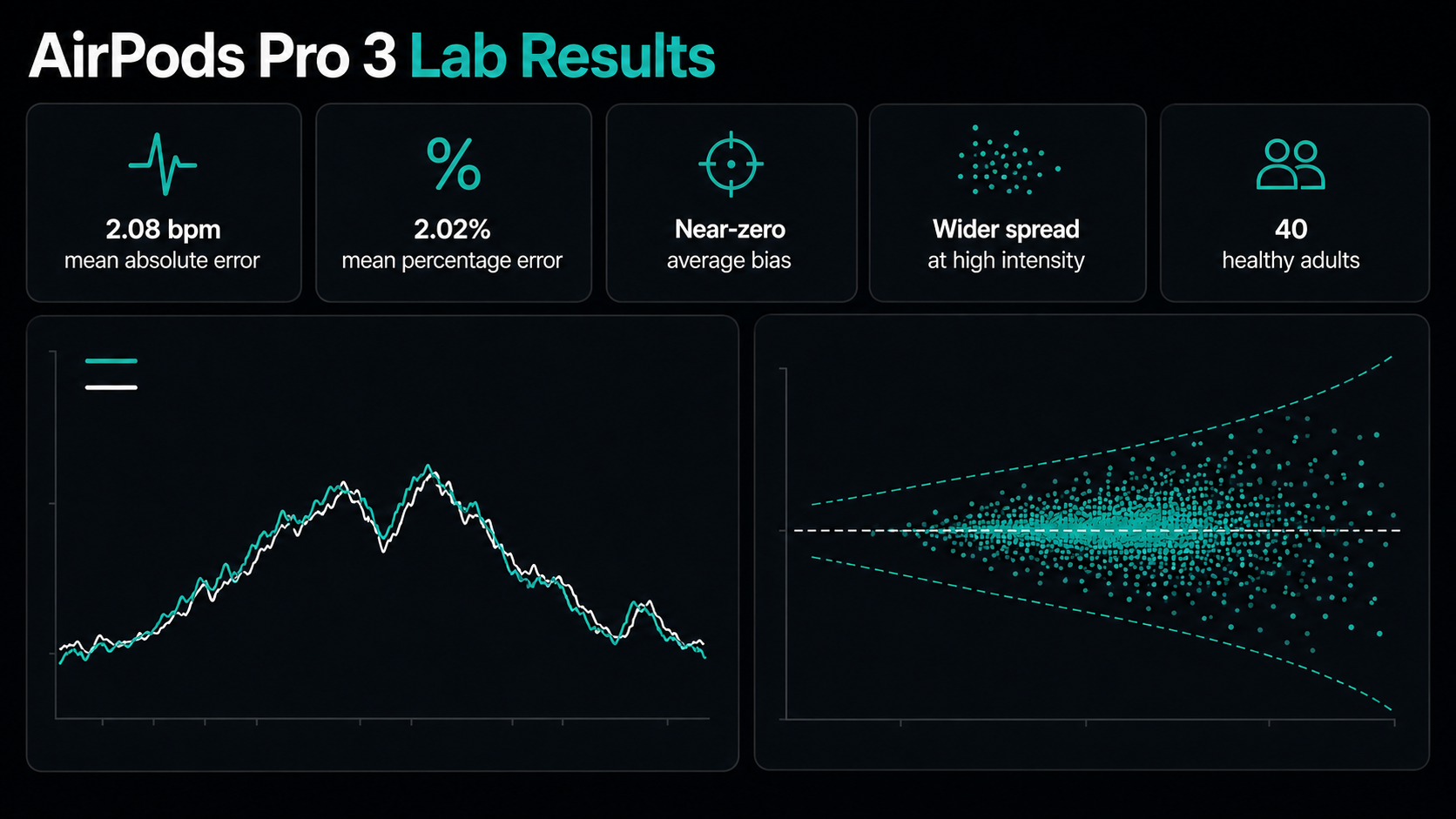
The near-zero bias is reassuring: over the full protocol, the earbuds did not systematically inflate or suppress heart rate. The wider limits of agreement add an equally important warning. A device can be highly accurate on average while an individual five-second reading is temporarily farther from the reference.
Accurate on Average Is Not Perfect Every Second
Imagine that AirPods Pro 3 reads slightly low during one interval and slightly high during the next. Those errors may nearly cancel when averaged across the workout. The average can look excellent even though a few real-time values briefly differ enough to place you in another zone.
That distinction changes how the data should be used:
- Steady Zone 2 session: a short difference of several beats may not change the training decision if the overall pattern, breathing, and effort remain stable.
- Thirty-second interval: heart rate itself lags behind effort, and temporary sensor variation makes it a weak real-time target.
- Threshold test: a few beats can affect a calculated boundary, so an electrical chest strap remains the safer reference.
- Weekly trend: a consistent sensor can be useful because the direction and duration of the response matter more than a single instant.
If your main question is whether the workout was broadly easy, moderate, or hard, the AirPods result may be more than adequate. If the question is whether heart rate crossed a narrow threshold at an exact time, the evidence supports more caution.
What the Study Does Not Prove
The study is encouraging, but it should not be stretched beyond its design. It involved 40 healthy adults in a controlled treadmill protocol with standardized fitting. It did not establish the same accuracy for every ear shape, age group, medical condition, outdoor temperature, or workout type.
It also did not comprehensively validate cycling on rough roads, rowing, strength training, trail running, swimming, or long events where fit and moisture may change over several hours. The authors explicitly noted that independent evidence for ear-worn sensing remains limited and that secure placement is a critical part of optical signal quality.
This is why one strong study should update confidence without ending the discussion. It supports AirPods Pro 3 as a credible fitness sensor. It does not make the earbuds clinical equipment or guarantee the same performance in every sport.
What Can Make AirPods Heart Rate Less Accurate?
Ear-tip fit
The sensor needs stable skin contact. Apple notes that the best ear-tip size for acoustic seal may not be the best size for heart-rate recording. If the value is dimmed, missing, or implausible, recheck the fit before interpreting the workout (Apple Support).
High-intensity movement
The validation study found greater spread at higher heart rates. Fast running can add head acceleration, jaw motion, and rapid physiological changes. The average response can remain good while individual points become noisier.
Cold conditions
Cold can reduce blood flow in the ears. Apple warns that lower skin perfusion may make it harder for the sensor to obtain an accurate reading. Give the signal time to settle and cross-check it with effort rather than reacting to the first number.
Moisture, earwax, piercings, and cleanliness
Anything that disrupts sensor-to-skin contact can matter. Apple specifically calls out moisture, earwax, nearby piercings, skin conditions, and dirty AirPods as possible sources of interference.
Individual anatomy and blood flow
Optical measurement quality varies between people. A result that is excellent for most runners does not guarantee the same fit or signal quality for every user.
A Practical Accuracy Check
You do not need a laboratory to notice obviously poor data. Use a familiar session and look for consistency.
- Select ear tips that keep the earbuds stable without discomfort.
- Clean the contact surfaces and charge the devices.
- Start with a gradual 10- to 15-minute warm-up.
- Include a steady segment and several controlled increases in effort.
- Mark laps or note the time of each change.
- Compare the heart-rate curve with pace, power, breathing, and perceived effort.
- If available, repeat the workout with a well-fitted chest strap as a reference.
Look for delayed rises, flat sections, sudden impossible jumps, missing data, or a value that follows running cadence rather than effort. Repeat the check before deciding the sensor is consistently wrong; one poor fit or cold start is not a product-level verdict.
Are AirPods Pro 3 Accurate Enough for Zone 2?
Usually, yes—provided the signal is stable and your zone boundaries are credible. Zone 2 is a broad training range, and steady sessions are less demanding on the sensor than abrupt intervals. Use breathing and the talk test as a second channel: a smooth heart-rate curve that matches conversational effort is more useful than obsessing over whether one moment was 137 or 140 beats per minute.
Remember that sensor accuracy and zone accuracy are separate. A perfectly measured heart rate can still be assigned to the wrong zone if maximum heart rate or threshold settings are wrong. The guide to Apple Watch heart-rate-zone accuracy explains that distinction, and the Zone 2 Heart Rate Calculator can help you review the underlying range.
Should You Trust AirPods Pro 3 Heart Rate?
Trust the pattern when the fit is secure, the values are plausible, and the curve responds sensibly to changes in effort. Treat any single number as an estimate rather than a verdict. For everyday endurance training and longer-term trends, the independent evidence is strong enough to make AirPods Pro 3 a credible option.
Use a chest strap when rapid response, threshold calibration, or high-resolution analysis matters. Stop exercising and seek appropriate medical care for chest pain, fainting, severe shortness of breath, or other concerning symptoms regardless of what any wearable displays.
Conclusion
AirPods Pro 3 delivered low average error and almost no systematic bias against a Polar H10 during controlled treadmill exercise. The most honest summary is accurate on average, with more momentary uncertainty at higher intensity.
That is a useful level of accuracy for steady workouts, broad zones, and trend review. It is not a promise of beat-for-beat precision in every sport or condition. Once the signal looks credible, turn the workout into a training log and judge it alongside pace, power, terrain, breathing, and perceived effort.

Our editorial approach & AI disclosure
We use AI to help research, organize, and draft some articles. Every article is reviewed by a human editor and aims to reflect current evidence-based training practices and scientific literature.
Read our editorial policy