

Heart Rate Zones
How Do You Use Apple Watch Heart Rate Zones for Training?
Apple Watch heart rate zones can guide easy days, tempo work, threshold workouts, and intervals when you check your zone settings, pair them with effort, and review weekly time in zones.

Introduction
Use Apple Watch heart rate zones as a training guide, not as a command to obey every second. The useful pattern is simple: check that your zones are credible, use the zone screen during cardio workouts to keep the session aligned with its purpose, and review time in zones afterward to see whether the week matched your plan.
Apple's current Watch user guide describes Heart Rate Zones as five effort segments based on a percentage of maximum heart rate, automatically personalized from Health data and available during cardio-focused workouts (Apple Watch User Guide). That makes the feature useful for runs, rides, hikes, and other endurance sessions where intensity matters.
The mistake is treating the color on the watch as the whole story. Wrist heart rate can lag during intervals, drift upward in heat, and misread when fit or motion interferes. Heart rate zones work best when you combine them with breathing, pace or power, perceived effort, terrain, and the goal of the workout.
First Check Your Zone Settings
Before you build training around Apple Watch zones, make sure the watch has the basic information it needs. Apple says Heart Rate Zones are calculated only when your date of birth is entered in the Health app, and the automatic zones are based on your health data (Apple Watch User Guide). If your birthdate, weight, sex, or other Health details are wrong, the watch may still show zones, but the interpretation can be off.
On Apple Watch, open Settings, go to Workout, then Heart Rate Zones. You can leave zones on Automatic or switch to Manual and edit the limits for Zones 2, 3, and 4. You can also do this from the Watch app on iPhone under My Watch, Workout, Heart Rate Zones.
Do not assume the automatic numbers are perfect. Maximum heart rate formulas are convenient, but they are population estimates. Tanaka, Monahan, and Seals showed that age-predicted maximum heart rate is an estimate with meaningful individual variation (Journal of the American College of Cardiology01054-8)). Two athletes of the same age can have different true maximum heart rates, thresholds, and training histories.
That does not mean you must immediately replace Apple Watch zones. It means you should sanity-check them. If an easy jog always appears as Zone 3, or a hard interval never rises above Zone 2, the zones or the measurement may be wrong. If the zones mostly match breathing and effort, they are probably useful enough for day-to-day guidance.
View Zones During A Workout
Start a cardio-focused workout in the Workout app, then turn the Digital Crown until you reach the Heart Rate Zone workout view. Apple says this view shows your current zone, heart rate, time in the current zone, and average heart rate (Apple Watch User Guide).
Use that screen differently depending on the session. On an easy day, glance at it to keep the workout from drifting too hard. On a tempo day, use it to confirm that the effort is steady and controlled. On intervals, use it as a delayed signal rather than an instant throttle, because wrist heart rate often takes time to catch up to short surges.
Apple Watch measures heart rate continuously during workouts and for three minutes after the workout ends to estimate recovery rate (Apple Support). That makes it useful for longer steady sessions and post-workout review. It is less precise for every five-second decision inside a short interval.
Match Each Zone To A Training Purpose
The most practical way to use zones is to assign each one a job.
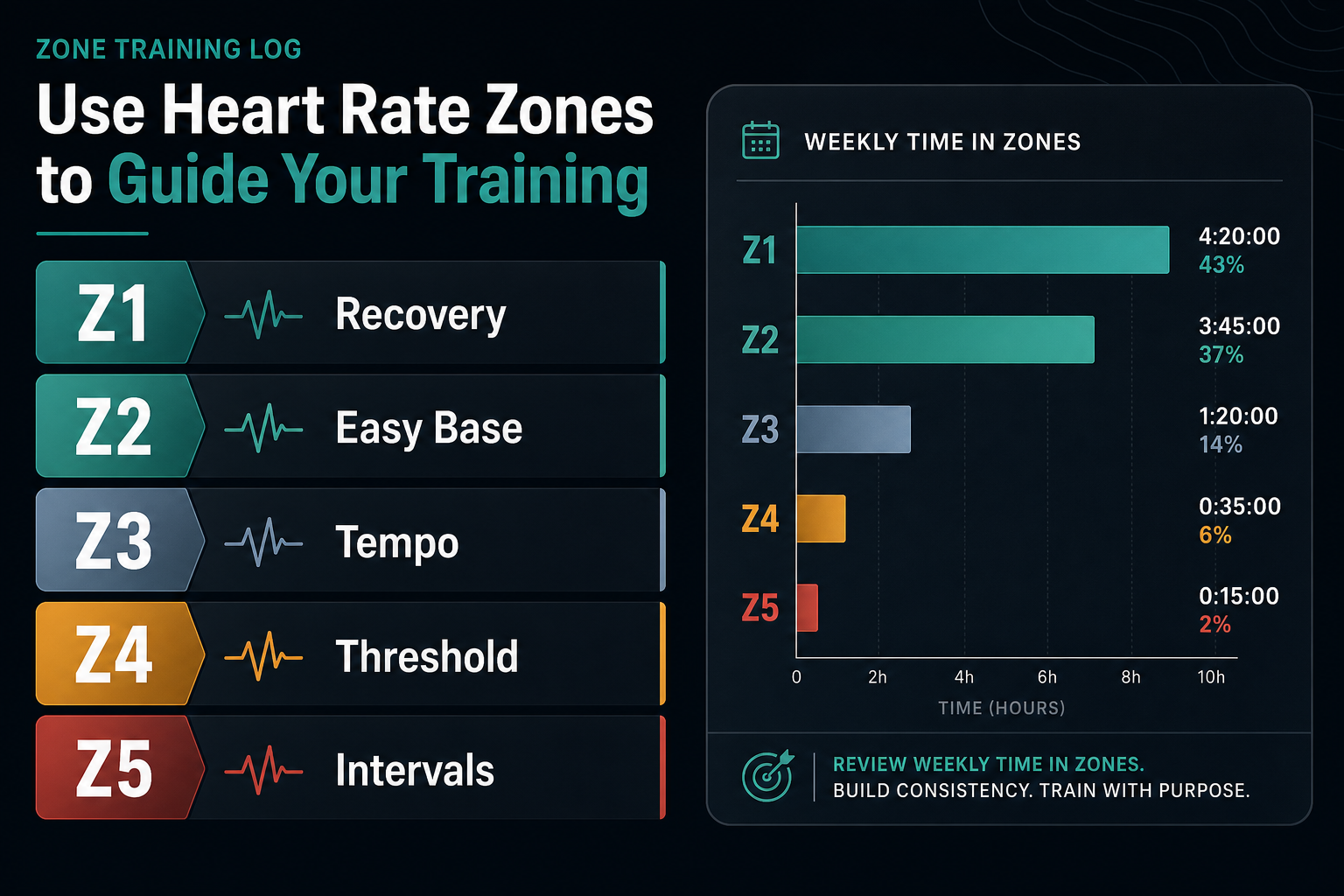
Zone 1 is recovery, warm-up, cool-down, and very light movement. It should feel easy enough that you could keep going without much mental effort. Do not dismiss it. Zone 1 helps you add movement without pretending every session has to be a workout.
Zone 2 is easy aerobic base work. In many endurance plans, this is the conversational range where you can accumulate time without much recovery cost. It is useful for easy runs, easy rides, long hikes, base training, and rebuilding consistency after a layoff.
Zone 3 is steady tempo. It can be productive when planned, especially for race-specific endurance or sustained steady work, but it is also where many easy days accidentally become too hard. If every easy workout becomes Zone 3, you are no longer using the watch to separate easy from moderate.
Zone 4 is threshold-style work. It is hard, controlled, and usually limited to deliberate blocks. This is not where most recovery days or base sessions should live.
Zone 5 is short hard interval work. It can support VO2 max and high-intensity sessions, but the watch may show it late because heart rate response lags behind sudden increases in effort. For short intervals, use pace, power, or perceived effort alongside heart rate.
Do Not Chase The Watch Every Second
Heart rate is a response to work. It is not the work itself. Pace, grade, heat, fatigue, caffeine, hydration, sleep, and stress can all change the number without changing the planned training purpose.
On easy runs and rides, a good use of Apple Watch zones is to set a ceiling. If you want an easy aerobic session, start slower than feels necessary and let the watch confirm that heart rate is staying low. If it climbs late while pace stays steady, you may be seeing cardiac drift, heat stress, dehydration, or accumulating fatigue. That is a reason to slow down or shorten the session, not necessarily a reason to declare the workout failed.
On hills and trails, let pace vary. Trying to hold flat-road pace uphill will often push heart rate into a higher zone. Walking a steep hill during an easy run can be the correct training decision.
On intervals, do not wait for the watch to reach the target zone before the work starts. Heart rate takes time to rise. A one-minute hill repeat may be hard enough even if the watch only shows Zone 4 near the end. For short hard work, use the prescribed pace, power, incline, or effort for execution, then use heart rate data afterward to understand the session.
Cross-Check With Effort And The Talk Test
The easiest reality check is breathing. The CDC describes moderate intensity as an effort where you can talk but not sing, while vigorous intensity makes speaking more difficult (CDC). For many easy aerobic sessions, you should be able to speak in full sentences.
Use that alongside the watch. If Apple Watch says Zone 2 and you can speak comfortably, the session is probably easy enough. If it says Zone 2 but you are breathing hard and bargaining with yourself, trust the body signal. If it says Zone 3 on a hot day but your breathing is relaxed and the route is hilly, review the larger pattern before changing your whole plan.
The goal is not to win the zone screen. The goal is to make the workout do the job you planned.
Review Time In Zones Afterward
After the workout, review the heart rate section in the Fitness app on iPhone. Apple says you can open Fitness, choose a workout, and view a graph of estimated time spent in each zone (Apple Watch User Guide).
That review is often more valuable than the live screen. One odd minute in Zone 3 does not matter much. A pattern where every easy workout spends half its time in Zone 3 does matter. A long ride with most time in Zones 1 and 2 and a few climbs in Zone 3 is different from a "recovery" ride that becomes steady tempo from start to finish.
Review the week, not only the workout. Seiler's review of endurance training intensity distribution describes how successful endurance athletes often organize a large share of training at low intensity with smaller amounts of hard work (International Journal of Sports Physiology and Performance). That is not a command that every recreational athlete must follow an exact 80/20 split. It is a useful warning against accidentally making every session moderately hard.
If your goal is general health and consistency, the American College of Sports Medicine's exercise guidance supports regular moderate-to-vigorous aerobic work as part of a broad fitness routine (Medicine & Science in Sports & Exercise). If your goal is endurance performance, the more specific question is whether your week includes enough low-stress aerobic volume to support the harder sessions.
Build A Week With Apple Watch Zones
A simple week might include two or three easy Zone 1-2 sessions, one longer easy aerobic session, and one focused quality session. The quality session could be Zone 3 tempo, Zone 4 threshold intervals, or short Zone 5 work depending on the training phase. The important part is that each session has a clear purpose before you start.
For an easy day, the instruction is not "stay perfectly in Zone 2." A better instruction is "keep the whole session easy enough to recover from." That may mean mostly Zone 1 and Zone 2, with brief Zone 3 on hills.
For a long aerobic day, use zones to manage durability. If heart rate climbs earlier than normal at a familiar pace, slow down or shorten the route. If the same effort produces a lower heart rate over several weeks, that can be a sign of improving aerobic efficiency, especially when pace, terrain, and conditions are comparable.
For a tempo workout, use Zone 3 deliberately. Warm up, settle into the planned steady effort, and avoid turning it into a race. Apple Watch zones can help you see whether the session stayed controlled or crept into threshold.
For intervals, use heart rate after the workout to confirm stress. Short intervals may not show much Zone 5 time even when they were intense. Longer intervals, hill repeats, and threshold sessions are more likely to create a visible zone pattern.
Know The Limits Of Wrist Heart Rate
Apple Watch can be very useful, but the optical sensor is still measuring blood-flow changes at the wrist. Apple explains that fit matters, the sensor should stay close to the skin during workouts, and factors such as skin perfusion, tattoos, cold conditions, and irregular movement can affect readings (Apple Support). Apple also notes that some users may not get a reliable reading every time, even under ideal conditions (Apple Support).
Independent research supports the same general caution. Wang and colleagues studied wrist-worn heart rate monitors during aerobic exercise and found accuracy varied by device and activity (JAMA Cardiology). The practical takeaway is not that wrist heart rate is useless. It is that you should avoid making high-stakes decisions from one suspicious reading.
If heart rate data regularly looks wrong, tighten the band slightly for workouts, wear the watch on top of the wrist, choose the workout type that best matches the activity, and compare the watch with effort. For athletes who need more reliable training-zone data, a Bluetooth chest strap or arm-band monitor can be a better option, especially for intervals and cold-weather sessions.
Common Mistakes
The first mistake is using zones before checking whether they make sense. If your max heart rate estimate is too low, normal easy training may look too hard. If it is too high, hard workouts may look easier than they are.
The second mistake is chasing Zone 2 so rigidly that the workout becomes stressful. Zone 2 should usually feel easy and repeatable. If staying in the exact range forces constant stopping, restarting, and anxiety, use the watch as a guide and review the trend later.
The third mistake is letting easy days become Zone 3 because the watch makes moderate effort feel productive. Zone 3 has a place. It should not become the default because every run starts too fast.
The fourth mistake is ignoring recovery. If a familiar pace suddenly produces a higher heart rate and worse perceived effort, that may be fatigue, illness, heat, dehydration, or stress. Adjust the day before you force the plan.
The fifth mistake is treating Apple Watch zones as medical feedback. Training zones are not a diagnosis tool. If you have chest pain, fainting, unusual shortness of breath, a new irregular heartbeat, or unexplained symptoms, stop the workout and seek medical care.
Conclusion
Apple Watch heart rate zones are most useful when they help you make better training decisions. Check your settings, use the live zone screen to keep easy days easy and quality days focused, and review time in zones afterward to see whether the week matched your plan.
Do not let the watch replace judgment. Pair zone data with breathing, perceived effort, pace or power, terrain, and recovery. When the numbers and the body signal agree, Apple Watch zones can be a clear guide. When they disagree, investigate before you redesign your training.
Keep the Zones in Context
A zone display becomes more useful when it sits beside the workout type, route, perceived effort, and the surrounding week. Use the practical guide to turn Apple Watch data into a training log, then review patterns instead of judging one chart in isolation.

Our editorial approach & AI disclosure
We use AI to help research, organize, and draft some articles. Every article is reviewed by a human editor and aims to reflect current evidence-based training practices and scientific literature.
Read our editorial policy