

Training Log & Analytics
How Do You Use Apple Health Workouts for Endurance Training?
Apple Health workouts become useful for endurance training when you turn them into a zone-based training log with context, summaries, and weekly decisions.

Introduction
To use Apple Health workouts for endurance training, treat Apple Health as the data source and build a training log around it. The workout record tells you what happened. A training log helps you decide what that workout means, how it fits into the week, and what should change before the next run, ride, hike, or other endurance session.
Apple Health can hold workouts from Apple Watch and from other apps that write to HealthKit. Depending on the recording device and app, those workouts may include duration, heart rate, distance, route, energy, elevation, pace, power, effort, and source-device details. Apple Watch also measures heart rate during workouts and for a short recovery period after the workout ends, according to Apple Support.
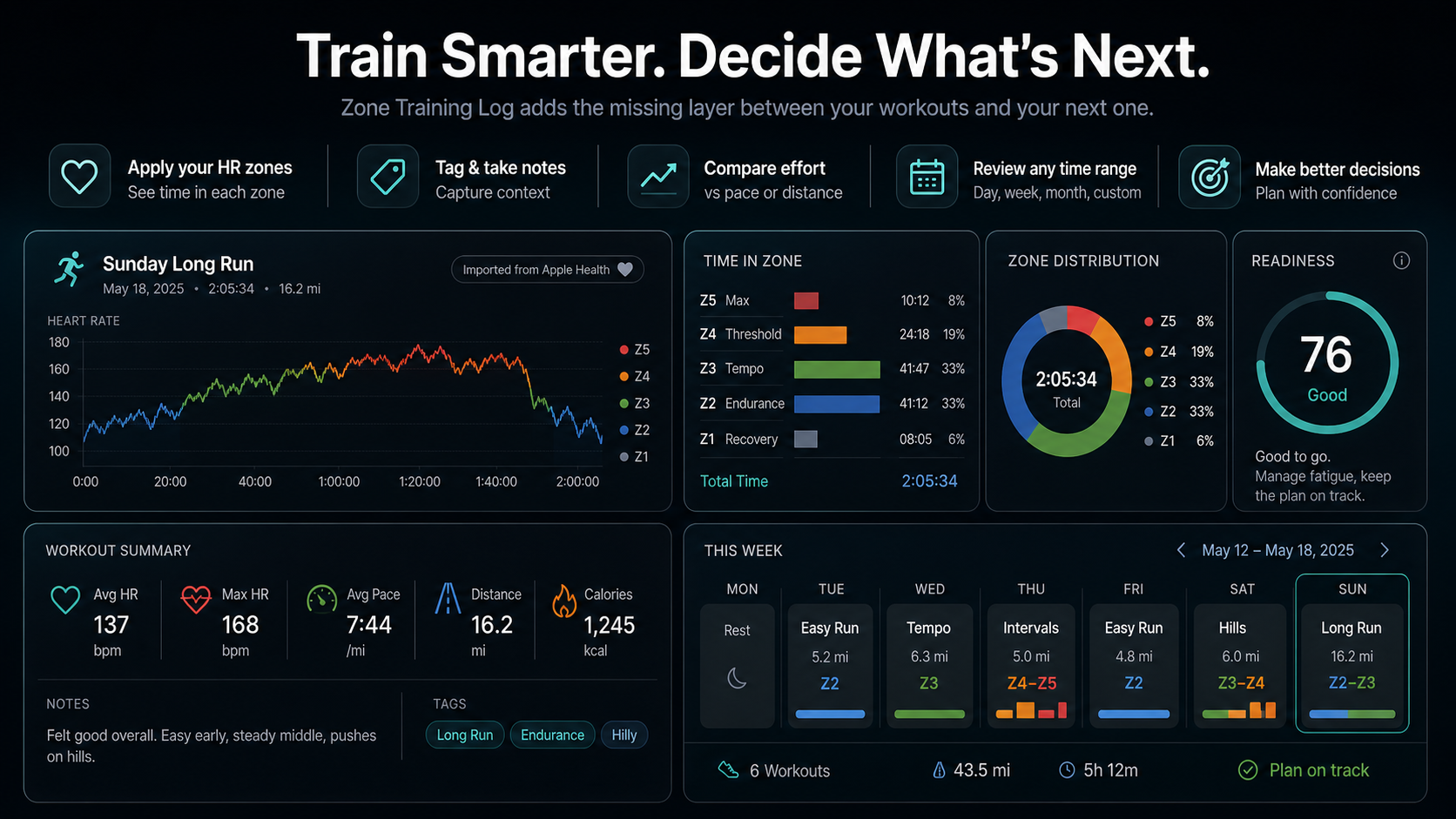
That is useful, but it is still only the starting point. Endurance training depends on patterns: how much low-intensity time you are accumulating, how much harder work you are adding, whether easy days stay easy, and whether your body is responding differently at the same pace or power. Zone Training Log is built for that layer. It reads Apple Health workouts with permission, turns heart-rate data into time-in-zone summaries, lets you add context, and shows daily, weekly, monthly, or custom-range views so Apple Health data becomes a practical endurance log.
What Apple Health Workouts Can Tell You
An Apple Health workout is a structured record of a session. For endurance athletes, the most useful fields are usually duration, distance, heart rate, route, elevation, pace or speed, calories or energy, and sometimes running or cycling power. These are not always present in every workout. They depend on the source app, device, sensor, sport type, and the permissions you grant.
The first distinction to understand is internal load versus external load. External load describes the work you did: distance, pace, power, elevation, time, or mechanical output. Internal load describes how your body responded: heart rate, rating of perceived exertion, breathing, soreness, and fatigue. A consensus statement on training-load monitoring describes this separation as central to athlete monitoring because internal and external load do not always move together (Bourdon et al.).
Apple Health can store both sides of that picture when the data exists. A run might show 50 minutes, 6 miles, a rolling route, and an average heart rate of 143 bpm. A training log asks the next question: was that the right response for the workout's purpose? If the run was supposed to be easy, the answer depends less on the average pace and more on whether the heart rate stayed mostly in low aerobic zones.
That is why endurance athletes should not use Apple Health workouts only as a calendar of completed sessions. The real value appears when the workout data is grouped into zones, labeled by purpose, compared across weeks, and reviewed before the next decision.
Start With Permissions And Workout Sources
The first step is making sure the right data reaches Apple Health. If you record with Apple Watch, the watch and Fitness app usually write workouts into the Apple ecosystem automatically. If you record with another app or device, check whether that app writes workouts, heart rate, route, distance, and power data to Apple Health.
Health data is permission-based. Apple's HealthKit documentation describes the framework apps use to request authorization for reading and writing health data (Apple Developer Documentation). In practical terms, this means a training app can only read the Apple Health categories you allow. If heart-rate data is missing from a log, the cause may be a missing permission, a source app that did not write samples, or a workout type that never recorded heart rate.
Zone Training Log follows that model. On iOS, it reads Apple Health data only after you grant HealthKit permission. Its privacy policy says it can read workouts, heart rate, routes when available, resting heart rate, energy, distance, effort metrics, running and cycling power, and date of birth when needed for zone calculations. It can also write manual workouts and effort values back to Apple Health when you choose to create or update them (Zone Training Log Privacy Policy).
For endurance training, the practical setup checklist is short:
- Record workouts consistently with Apple Watch or an Apple Health-compatible app.
- Confirm that the source app writes workouts to Apple Health.
- Grant the training log permission to read workouts and heart rate.
- Grant route, distance, power, or effort permissions when those metrics matter.
- Keep your Health profile details current if your zone method uses age or maximum heart-rate estimates.
Once those pieces are in place, Apple Health becomes the source of truth and the training log becomes the interpretation layer.
Turn Workouts Into Heart-Rate Zone Summaries
Heart-rate zones make Apple Health workouts easier to interpret because they translate thousands of heart-rate samples into training intensity. Instead of scanning a full heart-rate chart every time, you can ask a simpler question: how much time did this workout spend in each zone?
Apple Watch can show heart-rate zones during workouts. Apple says the zones are five effort segments based on a percentage of your maximum heart rate, and they are personalized using Health data when the required profile information is available (Apple Watch User Guide). That makes zones familiar to Apple Watch users, but the important training step is reviewing those zones after the workout and across a full week.
Zone Training Log turns Apple Health workouts into time-in-zone summaries. That is useful because endurance training is often built around intensity distribution. For example, an easy base run should usually contain mostly low-zone time. A threshold workout should show a controlled block around the intended steady-hard intensity. A long ride might start easy and drift upward later as heat, fatigue, dehydration, or terrain changes the heart-rate response.
Zones also make mistakes visible. If an "easy" workout keeps spending 40 minutes in Zone 3, the label and the physiology disagree. If a high-intensity workout barely reaches higher zones, the target, warmup, terrain, fatigue level, or sensor quality may need review. The log does not make the decision for you, but it gives you the evidence in a format you can scan.
Check Whether Your Zones Fit Your Body
Zone summaries are only as useful as the zone boundaries behind them. If your maximum heart-rate estimate is too low, normal aerobic work can look too intense. If it is too high, hard work can look easier than it is. If resting heart rate is stale or the method is wrong for your training style, zone labels may drift away from how the effort actually feels.
Age-based maximum-heart-rate formulas are convenient, but they are population estimates. Tanaka, Monahan, and Seals proposed the commonly cited 208 minus 0.7 times age equation, but the broader takeaway is that individual variation remains large enough to affect zone placement for real athletes (Journal of the American College of Cardiology01054-8)).
Use Apple Health zone data as a starting point, not as a law. A practical check is to compare zone labels with breathing and perceived effort. The CDC's intensity guide describes moderate activity using the talk test: you can talk but not sing at moderate intensity, while vigorous activity makes speaking more difficult (CDC). That is not a lab test, but it is useful when your watch says an easy run is moderate or hard.
Zone Training Log supports editable zones and different setup approaches, including maximum heart rate, heart-rate reserve, age-based methods, and manual thresholds. If you refine your zones, the app can recalculate zone summaries so past workouts are evaluated against the same model. That matters for endurance training because the week-to-week trend should reflect training changes, not a hidden zone-setting change.
Compare Internal Load With External Output
Endurance training gets more useful when you compare internal load with external output. Heart rate alone can tell you how hard your body worked. Distance, pace, speed, elevation, and power tell you what you produced. The relationship between the two is often more informative than either number by itself.
For example, imagine two 60-minute runs on similar terrain. In week one, the run averages 6:00 per kilometer at 142 bpm. In week six, the same route averages 5:45 per kilometer at 140 bpm. That suggests improved aerobic output at a similar internal cost. The reverse pattern can also matter: if pace drops while heart rate rises, you might be dealing with heat, fatigue, poor sleep, illness, dehydration, or accumulated load.
Heart rate has known limitations. Achten and Jeukendrup reviewed practical uses and limitations of heart-rate monitoring in sport, including the need to interpret heart rate in context rather than treating it as a perfect measure of exercise intensity (Sports Medicine). Cardiac drift is another example: during prolonged exercise, heart rate can rise over time even when the external workload is stable, especially when heat stress and dehydration are involved (Coyle and Gonzalez-Alonso).
This is where Apple Health workouts become valuable raw material. A single workout can show whether heart rate rose late. A log can show whether that pattern repeats across long runs, summer rides, or high-load weeks. Zone Training Log adds the practical view: time in zone, average and maximum heart rate, distance, pace, elevation, energy, effort, tags, notes, and period summaries in one workflow.
Use Weekly Zone Distribution To Shape Training
After a few workouts, the most important question stops being "What happened today?" and becomes "What is the week becoming?" Endurance training is usually shaped by the accumulation of easy volume, the placement of harder sessions, and the relationship between load and recovery.
Research on endurance athletes often highlights the importance of intensity distribution. Seiler and Kjerland studied well-trained endurance athletes and found that most endurance training time occurred below the first ventilatory threshold, with a smaller proportion at higher intensities (Scandinavian Journal of Medicine & Science in Sports). That does not mean every athlete should copy one exact split, and it does not replace coaching judgment. It does show why viewing intensity distribution across a week or block matters more than obsessing over one workout.
Apple Health stores sessions. Zone Training Log lets you summarize them. A useful weekly review should answer questions like these:
- How much total endurance time did I complete?
- How much of that time was low intensity?
- Did hard-zone time come from planned workouts or accidental drift?
- Did easy days stay easy enough to support the next hard day?
- Did the week include too much steady middle intensity for the goal?
- Did notes, tags, or effort scores explain unusual heart-rate patterns?
When you review the week by zone distribution, the plan becomes easier to adjust. If the week was supposed to be aerobic but has too much moderate intensity, protect the next easy day. If the hard workout never reached the intended zone, adjust the workout design or rest before the next attempt. If low-zone volume is rising smoothly and effort is stable, the block may be progressing well.
Add Context Apple Health Cannot Know
Apple Health can store a lot of workout data, but it cannot fully know the purpose of a session. It does not know whether a run was meant to be recovery, aerobic base, threshold, hills, intervals, race rehearsal, commute, social run, or a tired compromise after a poor night of sleep.
That missing context is why notes, tags, titles, and effort scores matter. A workout titled "Easy aerobic run" with tags for "heat" and "trail" is easier to interpret later than a generic outdoor run. A ride tagged "threshold" should be judged differently from a ride tagged "endurance." A long hike with high heart rate might be perfectly reasonable if the route involved elevation and a pack.
Rating of perceived exertion is especially useful because it captures what the sensor cannot. If heart rate looks low but effort felt high, that mismatch is worth noticing. If heart rate looks high but effort was easy and the day was hot, the explanation may be environmental rather than fitness-related. Internal load research often treats heart rate and perceived effort as complementary rather than interchangeable (Bourdon et al.).
Zone Training Log adds this context around Apple Health workouts. You can add workout titles, notes, tags, and effort, then use those labels when reviewing individual sessions and longer summaries. Over time, those details turn a set of health records into a memory of the training process.
Watch For Sensor Noise And Missing Data
Apple Health workouts are only as reliable as the data written into them. A clean heart-rate recording from a well-fitted watch or chest strap can be very useful. A workout with long gaps, cadence lock, loose fit, or missing samples needs more caution.
Apple notes that wrist heart-rate readings can be affected by fit, skin perfusion, tattoos, motion, and cold weather, and that users can pair a Bluetooth chest strap when needed (Apple Support). Independent wearable studies have also found that wrist devices can vary in heart-rate accuracy by device and activity, especially during exercise (Wang et al.; Shcherbina et al.).
For endurance training, that means you should inspect outliers instead of blindly accepting them. A workout that instantly jumps to maximum heart rate during an easy warmup may be a sensor artifact. A ride with missing heart-rate samples should not drive major training decisions. A long run with a smooth rising heart-rate curve is more likely to be a meaningful drift pattern.
The practical rule is simple: use trends, not single glitches. Apple Health data becomes powerful when patterns repeat across multiple workouts. If the same easy route is gradually getting faster at the same heart rate, that is meaningful. If one workout contains a strange spike and the notes say the watch was loose, ignore the spike.
Use Zone Training Log As The Endurance Training Layer
Apple Health is the source of truth for workouts and health records, but it is not the same thing as an endurance training log. Zone Training Log adds the layer athletes need for decisions: import Apple Health workouts, apply your heart-rate zones, show time in zone, keep notes and tags, compare effort with pace or distance, and review daily, weekly, monthly, or custom summaries.
The app's workflow maps well to endurance training:
- Connect Apple Health and import workouts automatically.
- Set heart-rate zones from health data, formulas, or manual thresholds.
- Review each workout with zone distribution, heart-rate charts, effort, distance, pace, elevation, energy, and source details.
- Add titles, notes, tags, and activity colors so the workout has meaning later.
- Review daily, weekly, monthly, or custom summaries to understand volume and intensity distribution.
- Use readiness and zone balance views as checks before deciding whether to push, absorb, or adjust.
- Plan workouts and compare completed sessions with what was intended.
This is not about replacing Apple Health. It is about making Apple Health useful for endurance decisions. Apple Health stores the records. Zone Training Log organizes those records around the questions endurance athletes ask every week: Did I build enough easy volume? Did I place intensity correctly? Am I drifting into too much moderate work? Does today's plan still make sense?
Privacy also matters because health data is sensitive. Zone Training Log's privacy policy describes a local-first model: before you connect a web account, detailed workout history is not synced to the Zone Trainer account backend. If you connect an account, the app can sync a compact cross-platform training mirror with workout metadata, zone metrics, summaries, tags, notes, and a compact heart-rate preview, while normal account sync does not upload every raw heart-rate sample or full HealthKit routes (Zone Training Log Privacy Policy).
A Simple Weekly Apple Health Workflow
Here is a practical weekly workflow for using Apple Health workouts in endurance training:
- Record workouts normally with Apple Watch or another Apple Health-compatible app.
- Open Zone Training Log and let the latest Apple Health workouts import.
- Check the workout's time in each heart-rate zone.
- Compare heart rate with pace, distance, power, elevation, and route context.
- Add a title, tag, note, and effort score when the context matters.
- Review the weekly summary for total time, zone distribution, average effort, distance, and trend direction.
- Adjust the next workout based on the week, not just yesterday's session.
For an easy week, the most important signal may be whether low-zone time is actually low. For a build week, it may be whether total time is rising without effort scores climbing too quickly. For a race-specific block, it may be whether hard sessions are landing where planned while easy days still protect recovery.
The workflow should stay simple. You do not need to analyze every workout for 20 minutes. A few consistent checks are enough: purpose, time in zone, internal-versus-external load, notes, and the weekly pattern.
Common Mistakes To Avoid
The first mistake is treating every Apple Health workout summary as equally trustworthy. Check whether heart-rate samples are present, whether the source app wrote complete data, and whether the sensor recording looks plausible.
The second mistake is using default zones forever without checking whether they match your breathing and effort. If easy workouts always look too hard, or hard workouts never look hard, review the zone method before changing the training plan.
The third mistake is focusing only on averages. Average heart rate can hide a workout that started easy and drifted hard. Time in zone and the heart-rate curve usually tell a clearer endurance story.
The fourth mistake is ignoring context. Terrain, weather, heat, fatigue, sleep, fueling, and training phase all change how Apple Health data should be interpreted. Notes and tags are what keep those explanations attached to the workout.
The fifth mistake is reviewing only individual sessions. Endurance adaptation comes from repeated work and recovery. Weekly and monthly summaries are where Apple Health workouts become a training system.
Conclusion
Apple Health workouts are useful for endurance training when you turn them into a repeatable decision process. Use Apple Health as the record source, make sure permissions and workout sources are correct, translate heart-rate data into zones, compare internal load with external output, and review the week before changing the plan.
Zone Training Log is built for that workflow. It reads Apple Health workouts with permission, calculates zone summaries, adds titles, notes, tags, and effort, and shows daily and longer-range patterns so your training data becomes easier to act on.
The point is not to collect more numbers. The point is to make the next endurance decision clearer.

Our editorial approach & AI disclosure
We use AI to help research, organize, and draft some articles. Every article is reviewed by a human editor and aims to reflect current evidence-based training practices and scientific literature.
Read our editorial policy